Tag: training

  • Adobe Premiere Pro Workshop for Turner Asia Pacific

    Adobe Premiere Pro Workshop for Turner Asia Pacific

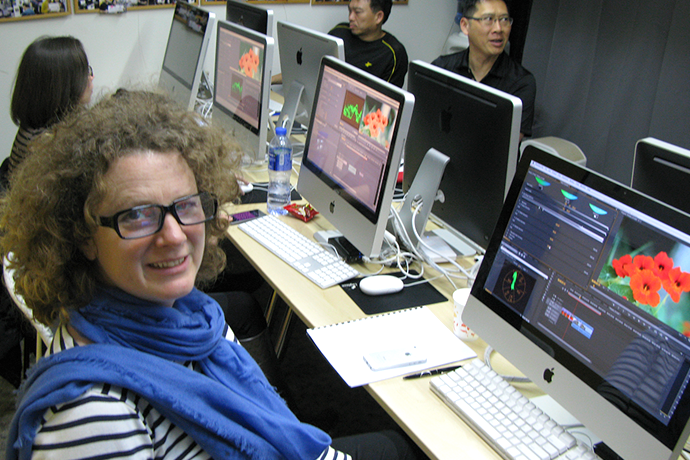
    This week we welcome back Turner Broadcasting System Asia Pacific to Fatbars. We had previously trained their editors and graphics department. This time is Fast Start Adobe Premiere Pro Workshop training for Turner Network Asia’s producers.

    It has always been quite a process for any company to migrate or update an existing workflow. When Turner Asia decided to move their workflow towards Adobe premiere pro as their main NLE, we were approached to come up with a customized training for their Adobe Premiere Pro MXF workflow.

    Turner Broadcasting System Asia Pacific, Inc. creates and distributes award-winning, branded news and entertainment media environments on television, and other platforms around the Asia Pacific region and beyond. Turner broadcasts 40 channels, in 12 languages, in 40 countries throughout Asia Pacific.Turner’s brands include CNN International, CNNj, CNN, HLN, Cartoon Network, Cartoonito, Boomerang, Pogo, Toonami, TCM Turner Classic Movies, truTV, WB, HBO, HBO HITS, HBO DEFINED, MONDO TV and TABI CHANNEL.

    Different audio with different languages like Thai, Chinese, English etc for different region in the Asia Pacific. That is why Turner’s on air promos are edited and finished with multi tracks of audio in the MXF format. Material eXchange Format (MXF) is a container format for professional digital video and audio media defined by a set of SMPTE standards.

    This customized training was divided into two groups once a week, to work around the busy schedule of their staff. Most of the producers are either Final Cut Pro 7 or Avid current users. The main objective of this training is to bring experience producers with existing NLE editing skills to Adobe Premiere Pro environment, and be able to continue their creative work with this additional new skills and workflow.

    We wish them best of luck.

    turner_2
    turner_1
    turner_3

    Copyright @ Fatbars Limited 2026

  • Being Certified as Pixotope Certified Expert

    Being Certified as Pixotope Certified Expert

    We are thankful that Samantha had the opportunity to participate in a recent Pixotope Certification training, alongside professionals from different parts of the world. Having successfully completed the certification exam, Samantha, has attained the title of Pixotope Certified Expert.

    With more than 20 years of experience in the broadcast industries, Samantha knows the challenges of setting up workflows for live production, where there’s no room for mistakes. Live productions can be demanding and stressful, and everything must work every time. Fix it in post is not always an option.

    Pixotope has been successfully deployed in live events like League of Legends, Riot Games, and The Weather Channel, making it a trusted choice for critical productions. Based in Oslo, Norway, Pixotope provides a virtual production solution for rapidly creating live motion and production graphics, virtual studios, augmented reality (AR), Extended reality (XR), and Mixed reality (MR) using Unreal Engine. Built for live on-air use with rapid design and deployment.

    The chance to gain hands-on experience and connect with Pixotope was an opportunity that Samantha could not let pass by. Our heartfelt thanks go out to Pixotope for making this possible.

    ** Please note that this training is not opened to public and only offered directly from Pixotope. Visit Pixotope’s website for more information. https://www.pixotope.com/

    pixo_newsletter

    Copyright @ Fatbars Limited 2026

  •  Gimp tutorial : Make instagram carousel post with Gimp

     Gimp tutorial : Make instagram carousel post with Gimp

    Gimp is a free and open-source video editing software that offers a range of features for creating high-quality photo editing tools. It is compatible with Windows, Mac, and Linux, making it easily accessible to a diverse user base.

    One of the most significant advantages of Gimp is its Photoshop like tools. The software is straightforward to use and does not require any prior experience in photo editing.

    This is where Fatbars post-production using open-source applications training series for creating content comes in. This tutorial is for the people who are tired of being tied up in a subscription plan like Adobe CC. This project-based tutorial provides a step-by-step guide from start to finish using Gimp. By following along with this five-part tutorial, you can learn how to create a professional instagram carousel with Gimp Tools. Creating content can often come with a hefty subscription price tag. Fortunately, open-source free applications like Gimp, it can help you create digital design on a budget.

    All the clips and graphics are provided in the links below. Happy Learning.

    Gimp-Instagram

    Course Outline
    Start : Setting up your Project
    Part 1 : Crop your design
    Part 2 : Resize your photo and set up your grids
    Part 3 : Add Graphic elements
    Part 4 : Add Text and Logo
    Part 5 : Slice and upload to Instagram

    Download the photos and graphics at the following websites. Links can be found below.

    Copyright @ Fatbars Limited 2026

  • OpenShot Video Editor Tutorial Series

    OpenShot Video Editor Tutorial Series

    OpenShot Video Editor is a free and open-source video editing software that offers a range of features for creating high-quality videos. It is compatible with Windows, Mac, and Linux, making it easily accessible to a diverse user base.

    One of the most significant advantages of OpenShot is its user-friendly interface. The software is straightforward to use and does not require any prior experience in video editing.

    This is where Fatbars post-production using open-source applications training series for creating content comes in. This project-based tutorial provides a step-by-step guide from start to finish using OpenShot Video Editor. By following along with this five-part tutorial, you can learn how to create similar projects on your own. In this project , you will create a short video promotion for Hong Kong. All the clips and graphics are provided in the links below.

    As the digital landscape continues to evolve, creating high-quality content has become essential for both individuals and businesses. Whether for personal or professional use, the need to produce engaging videos, podcasts, or other digital content is a top priority. However, creating this type of content can often come with a hefty price tag, making it a daunting task for those on a budget. Fortunately, open-source free applications like OpenShot Video Editor can help you create digital content on a budget. Happy learning.

    openshot_still

    Course Outline
    Part 1 : Import your media and set up your editing statio
    Part 2 : Editing your clips on the timeline
    Part 3 : Adding Transitions to multiple clips at the same time
    Part 4 : Animating graphical elements
    Part 5 : Adding Titles and Music

    Download the training clips and graphics at the following websites. Links can be found below.

    Copyright @ Fatbars Limited 2026

  • Real Time virtual avatars training for Chu Hai College

    Real Time virtual avatars training for Chu Hai College

    Student learn how to create Real Time Vtubers content at Chu Hai College. 

    Over a few weeks, Chu Hai College of Higher Education students created videos featuring their own virtual avatars performing in real-time using apps like VRoid and Flipside Studio.

    Vtubers use a virtual avatar created by a CG program and real-time motion capture software to perform online. Unlike virtual celebrities such as Hatsune Miku, the performer behind a VTuber is a real person, but they use virtual avatars to interact and perform real time with their character. No post production needed.

    The purpose of this course is to inspire students and explore the ways of creating real-time content. These media can be displayed in streaming media like YouTube and Twitch for real-time interaction, or presented through augmented reality platform.

    We hope to integrate more of these XR tools into our training curriculum in the future. Stay tune.

    Vtuber1
    Vtuber2
    Vtuber4
    Vtuber5
    Vtuber6
    Vtuber3

    Copyright @ Fatbars Limited 2026

  • How much disk space do you need?

    How much disk space do you need?

    Before starting any project that involves any form of shooting and editing videos for any occasion, there is ONE important question you have to answer. Your answer could increase and affect your budget both in terms of money, time and disk.

    “ Do I have enough disk space in my computer to do this project?” If you don’t, you will need to make space by trashing out or backing up stuff into a new drive, that is currently eating up your disk space in your computer.

    If you don’t spring clean and make space, you are going to run out space mid way through your project and crash your system. Period. But how do I find out? You need to know 2 things. 1) The file format of video saved when you record 2) The resolution of your video. Is it HD or 2K or 4K.

    There are nice folks out there that make a free Video Calculator that you can use. Remember, the average shooting ratio is 1 : 8. For every 1 min of usable video, you will be shooting 8 mins worth of video. After calculating the full sum, you are advised to at least x2 (double) or x3 (triple) the totals.

    Photos by Pixaby, cotton bro, Thank you for reading. Hope this helps you answer the question. If you want more tips like this in the future, let us know.

    #learnsomethingnew #learn #calledtobecreative #education #inspiration #learningthroughplay #creativebiz #creativeentrepreneur #creativelife #growyourbusiness #digitalmarketing #entrepreneurlife #entrepreneurmotivation #productivitypotential #creativityfound #creativebusiness #inspirationbusiness #selfgrowth #productivitytools #feedyourbrains #businessofdesign #training #postproduction #fatbarshongkong #setlife #premierepro #resolve #editing

    FYB_5.001
    FYB_5.003-1024x1024
    FYB_5.006-1024x1024
    FYB_5.005-1024x1024

    Copyright @ Fatbars Limited 2026

  • Does choosing the right color palette makes your head spin?

    Does choosing the right color palette makes your head spin?

    Colors is such an important part of branding. And yet it can be so taunting to choose the right colors that can complement your logo color, your website or brand. Fantastic tip here. I found this wonderful website to be so helpful. Check out this website https://coolors.co. It is simple and easy to use. You can even generate multiple color palettes without having to create an account first. Super awesome.

    If you have a logo brand color to match , or if you want to generate a color palette based on a photograph you like, you can do so right there, on the web page. Worked on chrome. Firefox, safari.

    Thank you for reading. Hope this helps you plan out your color palette for your brand. If you want more tips like this in the future, let us know.

    Photos by Andrea Piacquadio from Pexels.com

    #learnsomethingnew #learn #calledtobecreative #education #inspiration #learningthroughplay #creativebiz #creativeentrepreneur #creativelife #growyourbusiness #digitalmarketing #entrepreneurmotivation #productivitypotential #creativityfound #creativebusiness #selfgrowth #productivitytools #feedyourbrains #businessofdesign #training #postproduction #setlife #premierepro #resolve #editing #photoshop #skillshare #coolors

    FYB_colorpost1-1024x1024
    FYB_color.002-1024x1024
    FYB_color.004-1024x1024
    FYB_color.008-1024x1024

    Copyright @ Fatbars Limited 2026

  • Will VR Reality conferences takes the stage ?

    Will VR Reality conferences takes the stage ?

    With travel restriction and social distancing all over the world, conferences with thousands of people gathering in a single location seems highly unlikely to happen for a while. What about doing the event in Virtual Reality? Yes, it happened. The recent Microsoft Developer Conference Build 2020 was held virtually. When it came to Microsoft Hololens’ presentation, it was only fitting to host it in AltspaceVR.

    AltspaceVR is a place for real people to attend virtual conferences, live shows, meetups,  classes, and more with other people from  around the world inside VR. (https://altvr.com/) The best thing about presenting live events in AltspaceVR, is the fact that your guests don’t need a VR headset to attend. They can join in, on your computer like any virtual meeting (like Zoom). You just need to sign up for an account which is free. ** Although in VR is so much more fun **

    Before this event, we had ventured into AltspaceVR before, and attended their Educator’s Summit workshop, which was very well organized and presented. A discussion space was also created to let attendees socialize in a safe space after the presentation. You can even do a “virtual selfie” with other “people” there. Topics like how they are dealing with their students’ daily regular classes in VR, to social distancing practises among different schools all over the world. These are just some of the topics discussed among the attendees. Overall, our experiences were rewarding and insightful.

    Have you used AltspaceVR or attended their events before? Let’s discuss.

    #microsoft #altspace #VR #learnsomethingnew #learn #calledtobecreative #education #inspiration #learningthroughplay #creativebiz #creativelife #productivitypotential #creativityfound #creativebusiness #virtualreality #inspirationbusiness #selfgrowth #productivitytools #feedyourbrains #businessofdesign #virtualrealityexperience #vrartists #conferences #socialdistancing #education #alonebuttogether

    FYB_altspacepost-1024x1024
    FYB_altspace.002-1024x1024
    FYB_altspace.003-1024x1024
    FYB_altspace.009-1024x1024

    Copyright @ Fatbars Limited 2026

  • RTHK’s Fast Start 3D Printing Workshop

    RTHK’s Fast Start 3D Printing Workshop

    It can be really difficult for seasoned 2D designers to start designing and modeling 3D design and turning them into physical 3D printed objects. Understanding the strength and cons of different kind of 3D printing methods is crucial. Just because you can 3D model your design, does not mean your design will be printed without error.

    When we were asked to come up with a 3D printing course for experienced designers from RTHK, we decided to design the training to fit designers with no prior experience with 3D modelling and wants to get started with 3D printing fast. Tinkercad is a simple and well designed cloud app that runs well on Safari. Not only can the designers use this app to design their 3D models, they can also export the model as OBJ, and use it in our motion graphics app as a design elements.

    They also learn how to choose the right printer for your project. Understanding the current 3D technology and material available through a variety of 3D design tools, including 3D modeling and 3D scanning. They can also use existing drawing skills like illustrator, and create design in your 3D printing project. Each of the designer goes through the process from designing, 3D modeling to seeing their work 3D printed. Thank you for coming. We look forward to many more 3D design from these designers

    RTHK_3Dprint4
    RTHK_3Dprint2
    RTHK_3Dprint3
    RTHK_3Dprint5
    RTHK_3Dprint7
    RTHK_3Dprint6

    Copyright @ Fatbars Limited 2026

  • Fast Start After Effects and Resolve Workshops at ESF schools

    Fast Start After Effects and Resolve Workshops at ESF schools

    It is always exciting for Fatbars to go into an academic environment, bringing fast pace post production software training to teachers and students. In turn we learnt from them what kind of movies their generations are watching and the media content they consume. Tik Tok, Snapchat, Twitch are just some of the popular channels.
    As part their IB Career Programme and IB Film students from ESF island school get to worked with industry expert to recreate the Emmy winning title credits. Samantha trained students on how to use masks and filters to create special effects for films and videos using Adobe After Effects CC a motion graphics and visual effects software. The group then travelled to Sha Tin College to work with other Film students to replicate the Emmy winning title credits, inspired by the HBO show ‘True Detective’. Read the full information about the workshop here.

    As for South Island School, Sze delivered a Fast Start Da Vinci Resolve Workshop as part of their Film CPD day. This hands-on practice introduce the students to DaVinci Resolve software. Taking them from basic edit, basic color correction, to web delivery. Letting the students get hands-on experience with DaVinci Resolve. The standard for high end post production and finishing on more Hollywood feature films, television shows and commercials than any other software.

    Lastly, we want to thank both schools for having us. Hope to do it again next year.

    ESF1
    ESF2
    ESF3
    ESF4
    ESF6
    ESF8

    Copyright @ Fatbars Limited 2026